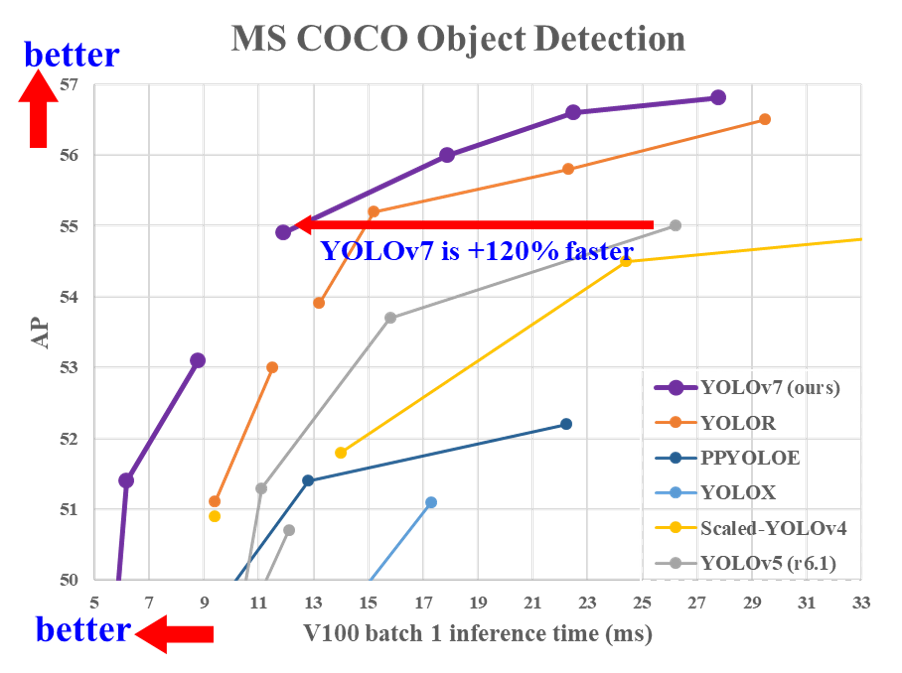
Step 1: Install Requirements
%%capture

!git clone https://github.com/WongKinYiu/yolov7 # Downloading YOLOv7 repository and installing requirements
%cd yolov7
!pip3 install -qr requirements.txt
!pip3 install -q roboflow
Downloading YOLOV7 starting checkpoint
!wget "https://github.com/WongKinYiu/yolov7/releases/download/v0.1/yolov7-tiny.pt"
--2023-01-29 18:45:31--  https://github.com/WongKinYiu/yolov7/releases/download/v0.1/yolov7-tiny.pt
Resolving github.com (github.com)... 140.82.114.4
Connecting to github.com (github.com)|140.82.114.4|:443... connected.
HTTP request sent, awaiting response... 302 Found
Location: https://objects.githubusercontent.com/github-production-release-asset-2e65be/511187726/ba7d01ee-125a-4134-8864-fa1abcbf94d5?X-Amz-Algorithm=AWS4-HMAC-SHA256&X-Amz-Credential=AKIAIWNJYAX4CSVEH53A%2F20230129%2Fus-east-1%2Fs3%2Faws4_request&X-Amz-Date=20230129T184531Z&X-Amz-Expires=300&X-Amz-Signature=c647faa15d61572a5b0518c7f611049a03338de58b5bccab859f1ac25531e650&X-Amz-SignedHeaders=host&actor_id=0&key_id=0&repo_id=511187726&response-content-disposition=attachment%3B%20filename%3Dyolov7-tiny.pt&response-content-type=application%2Foctet-stream [following]
--2023-01-29 18:45:31--  https://objects.githubusercontent.com/github-production-release-asset-2e65be/511187726/ba7d01ee-125a-4134-8864-fa1abcbf94d5?X-Amz-Algorithm=AWS4-HMAC-SHA256&X-Amz-Credential=AKIAIWNJYAX4CSVEH53A%2F20230129%2Fus-east-1%2Fs3%2Faws4_request&X-Amz-Date=20230129T184531Z&X-Amz-Expires=300&X-Amz-Signature=c647faa15d61572a5b0518c7f611049a03338de58b5bccab859f1ac25531e650&X-Amz-SignedHeaders=host&actor_id=0&key_id=0&repo_id=511187726&response-content-disposition=attachment%3B%20filename%3Dyolov7-tiny.pt&response-content-type=application%2Foctet-stream
Resolving objects.githubusercontent.com (objects.githubusercontent.com)... 185.199.111.133, 185.199.110.133, 185.199.109.133, ...
Connecting to objects.githubusercontent.com (objects.githubusercontent.com)|185.199.111.133|:443... connected.
HTTP request sent, awaiting response... 200 OK
Length: 12639769 (12M) [application/octet-stream]
Saving to: ‘yolov7-tiny.pt’

yolov7-tiny.pt      100%[===================>]  12.05M  8.95MB/s    in 1.3s

2023-01-29 18:45:33 (8.95 MB/s) - ‘yolov7-tiny.pt’ saved [12639769/12639769]
import os
import sys
import glob
import wandb
import torch
from roboflow import Roboflow
from kaggle_secrets import UserSecretsClient
from IPython.display import Image, clear_output, display  # to display images


print(f"Setup complete. Using torch {torch.__version__} ({torch.cuda.get_device_properties(0).name if torch.cuda.is_available() else 'CPU'})")
Setup complete. Using torch 1.11.0 (Tesla P100-PCIE-16GB)
I will be integrating W&B for visualizations and logging artifacts and comparisons of different models!
try:
    user_secrets = UserSecretsClient()
    wandb_api_key = user_secrets.get_secret("wandb_api")
    wandb.login(key=wandb_api_key)
    anonymous = None
except:
    wandb.login(anonymous='must')
    print('To use your W&B account,\nGo to Add-ons -> Secrets and provide your W&B access token. Use the Label name as WANDB. \nGet your W&B access token from here: https://wandb.ai/authorize')


wandb.init(project="yolov7-tiny",name=f"run11")
wandb: W&B API key is configured. Use `wandb login --relogin` to force relogin
wandb: WARNING If you're specifying your api key in code, ensure this code is not shared publicly.
wandb: WARNING Consider setting the WANDB_API_KEY environment variable, or running `wandb login` from the command line.
wandb: Appending key for api.wandb.ai to your netrc file: /root/.netrc
wandb: Currently logged in as: owaiskhan9515. Use `wandb login --relogin` to force relogin
/kaggle/working/yolov7/wandb/run-20230129_184537-3dr0ql2y
Step 2: Assemble Our Dataset

In order to train our custom model, we need to assemble a dataset of representative images with bounding box annotations around the objects that we want to detect. And we need our dataset to be in YOLOv7 format.
In Roboflow, We can choose between two paths:
- Convert an existing Coco dataset to YOLOv7 format. In Roboflow it supports over 30 formats object detection formats for conversion.
- Uploading only these raw images and annotate them in Roboflow with Roboflow Annotate.
Version v7 Jan 30, 2023 Looks like this.
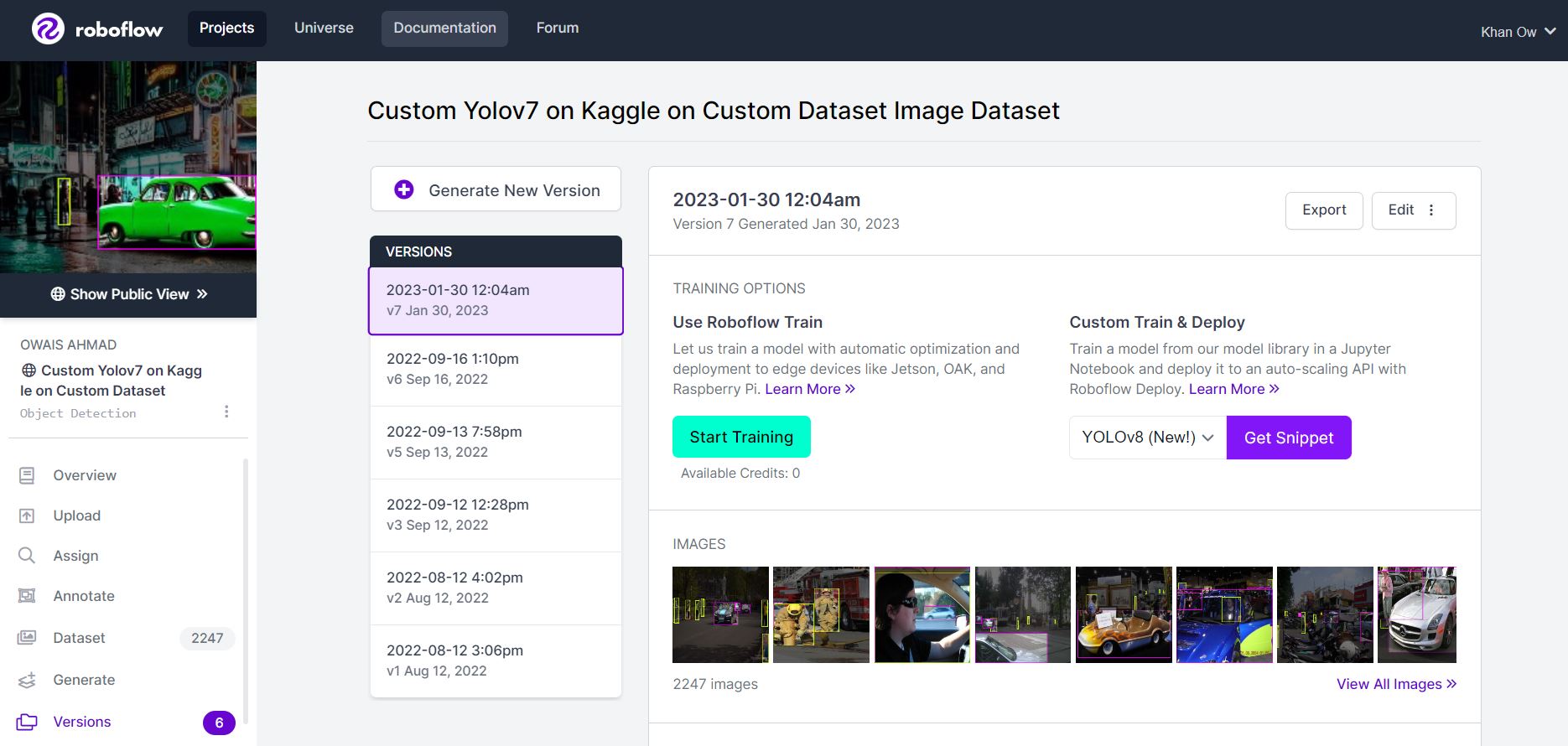
Since paid credits are required to train the model on RoboFlow I have used Kaggle Free resources to train it here
Note you can import any other data from other sources. Just remember to keep in the Yolov7 Pytorch form accept
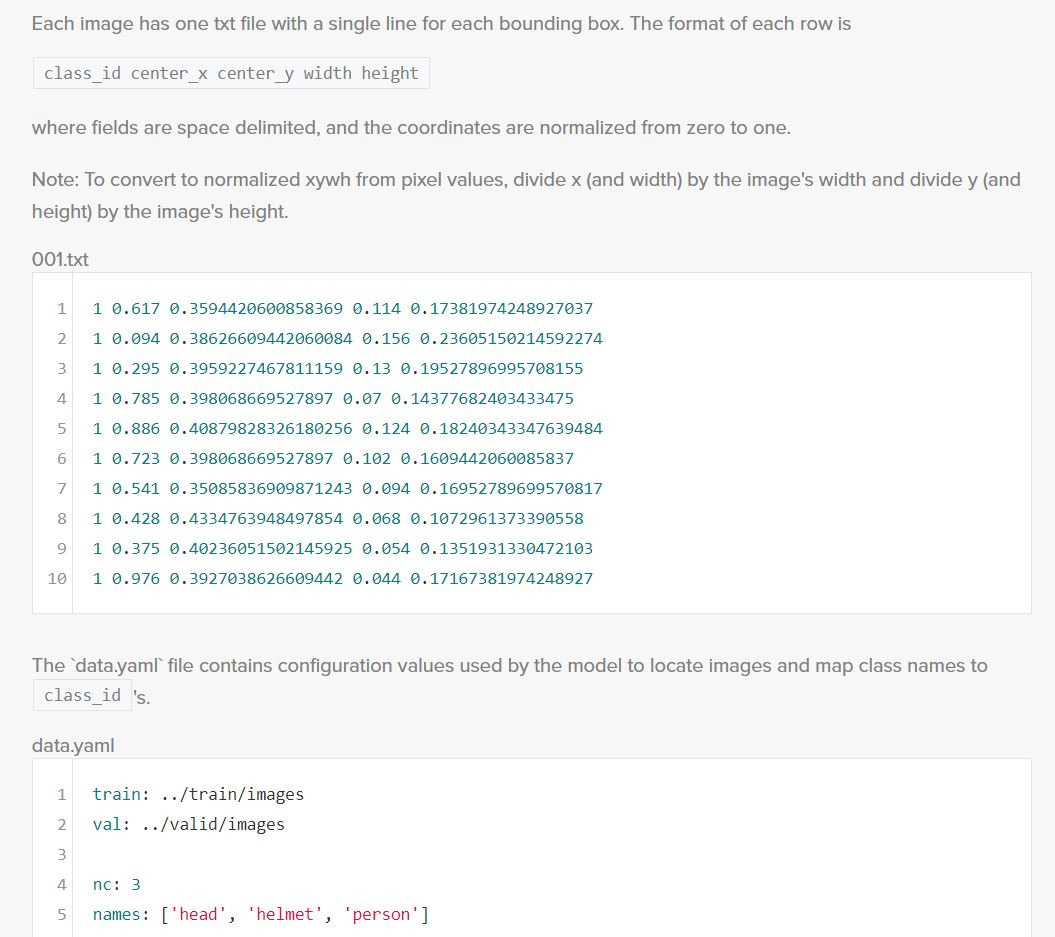
Update Commented down roboflow import to local import dataset
# user_secrets = UserSecretsClient()
# roboflow_api_key = user_secrets.get_secret("roboflow_api")
# rf = Roboflow(api_key=roboflow_api_key)
# project = rf.workspace("owais-ahmad").project("custom-yolov7-on-kaggle-on-custom-dataset-rakiq")
# dataset = project.version(2).download("yolov7")
# dataset = project.version(2).download("yolov7")
Step 3: Training Custom pretrained YOLOv7 model
Here, I am able to pass a number of arguments:
- batch: determine batch size
- cfg: define input Config File into YOLOv7
- epochs: define the number of training epochs. (Note: often, 3000+ are common here nut since I am using free GPU of kaggle I will be only defining it to 30!)
- data: Our dataset locaiton is saved in the
./yolov7/Custom-Yolov7-on-Kaggle-on-Custom-Dataset-2folder. - weights: specifying a path to weights to start transfer learning from. Here I have choosen a generic COCO pretrained checkpoint.
- device: Setting GPU for faster training
!ls
LICENSE.md  detect.py	models		  tools		yolov7-tiny.pt
README.md   export.py	paper		  train.py
cfg	    figure	requirements.txt  train_aux.py
data	    hubconf.py	scripts		  utils
deploy	    inference	test.py		  wandb
cd ..
/kaggle/working
!cp ../input/Car-Person-v2-Roboflow/Car-Person-v2-Roboflow-Owais-Ahmad/data.yaml data.yaml
!cp -R ../input/Car-Person-v2-Roboflow/Car-Person-v2-Roboflow-Owais-Ahmad Car-Person-v2-Roboflow-Owais-Ahmad
config_file_template = '''
train: ./Car-Person-v2-Roboflow-Owais-Ahmad/train/images
val: ./Car-Person-v2-Roboflow-Owais-Ahmad/valid/images

nc: 2
names: ['Person', 'Car']
'''

with open('data.yaml', 'w') as f:
    f.write(config_file_template)
!python yolov7/train.py --batch 64 --cfg cfg/training/yolov7-tiny.yaml --epochs 40 --data ./data.yaml --weights 'yolov7/yolov7-tiny.pt' --device 0 --entity 'yolov7-tiny' --project 'yolov7-tiny' --name 'run1'
wandb: Currently logged in as: owaiskhan9515. Use `wandb login --relogin` to force relogin
wandb: wandb version 0.13.9 is available!  To upgrade, please run:
wandb:  $ pip install wandb --upgrade
wandb: Tracking run with wandb version 0.12.21
wandb: Run data is saved locally in /kaggle/working/wandb/run-20230129_184638-1cmnn0yh
wandb: Run `wandb offline` to turn off syncing.
wandb: Syncing run run1
wandb: ⭐️ View project at https://wandb.ai/owaiskhan9515/yolov7-tiny
wandb: 🚀 View run at https://wandb.ai/owaiskhan9515/yolov7-tiny/runs/1cmnn0yh


wandb: Waiting for W&B process to finish... (success).
wandb:
wandb:
wandb: Run history:
wandb:      metrics/mAP_0.5 ▁▃▅▆▆▆▇▇▇▇▇▇████████████████████████████
wandb: metrics/mAP_0.5:0.95 ▁▂▄▄▅▅▆▆▅▇▇▇▇▇▇▇▇▇▇▇█▇██████████████████
wandb:    metrics/precision ▁▄▅▅▆▇▆▇▆▇▇▇█████▇████████▇██▇▇██▇████▇█
wandb:       metrics/recall ▁▄▅▆▆▆▇▆▇▇▇▇▇▇▇▇▇▇█▇█▇▇▇▇██▇███▇▇█▇████▇
wandb:       train/box_loss █▆▅▅▄▄▄▃▃▃▃▃▃▃▂▂▂▂▂▂▂▂▂▁▁▁▁▁▁▁▁▁▁▁▁▁▁▁▁▁
wandb:       train/cls_loss █▆▄▃▃▃▂▂▂▂▂▂▂▂▂▂▂▂▂▁▁▁▁▁▁▁▁▁▁▁▁▁▁▁▁▁▁▁▁▁
wandb:       train/obj_loss ▇▆▂▂▁▂▂▃▃▄▃▃▅▅▅▄▆▆▄▆▆▆▅▇▇▇▆▆▆█▆▇▅▅█▆▇▇██
wandb:         val/box_loss █▆▅▅▄▄▄▄▃▃▃▃▂▂▂▂▂▂▂▂▁▂▁▁▁▁▁▁▁▁▁▁▁▁▁▁▁▁▁▁
wandb:         val/cls_loss █▆▅▅▄▄▄▃▃▃▂▂▂▂▂▂▂▂▁▁▁▁▁▁▁▁▁▁▁▁▁▁▁▁▁▁▁▁▁▁
wandb:         val/obj_loss ▂▃▁▁▃▃▄▅▄▄▆▆▆▆▆▆▅▆▇▆▇▇▇▇▆▇▇▇▇▆▇▇█▇▇██▇█▇
wandb:                x/lr0 ▁▂▂▃▄▄▅▅▆▆▇▇▇▇█████████▇▇▇▆▆▆▅▅▅▄▄▄▄▃▃▃▃
wandb:                x/lr1 ▁▂▂▃▄▄▅▅▆▆▇▇▇▇█████████▇▇▇▆▆▆▅▅▅▄▄▄▄▃▃▃▃
wandb:                x/lr2 ████▇▇▇▇▇▇▆▆▆▆▆▅▅▅▅▅▅▄▄▄▄▄▃▃▃▃▃▂▂▂▂▂▂▁▁▁
wandb:
wandb: Run summary:
wandb:      metrics/mAP_0.5 0.67002
wandb: metrics/mAP_0.5:0.95 0.3577
wandb:    metrics/precision 0.75844
wandb:       metrics/recall 0.6032
wandb:       train/box_loss 0.04263
wandb:       train/cls_loss 0.00261
wandb:       train/obj_loss 0.02208
wandb:         val/box_loss 0.06196
wandb:         val/cls_loss 0.00736
wandb:         val/obj_loss 0.03359
wandb:                x/lr0 0.00101
wandb:                x/lr1 0.00101
wandb:                x/lr2 0.00111
wandb:
wandb: Synced run1: https://wandb.ai/owaiskhan9515/yolov7-tiny/runs/1cmnn0yh
wandb: Synced 5 W&B file(s), 342 media file(s), 1 artifact file(s) and 0 other file(s)
wandb: Find logs at: ./wandb/run-20230129_184638-1cmnn0yh/logs
Run Inference With Trained Weights
Testing inference with a pretrained checkpoint on contents of ./Car-Person-v2-Roboflow-Owais-Ahmad/test/images folder downloaded from Roboflow.
%%capture

!python yolov7/detect.py --weights yolov7-tiny/run1/weights/best.pt --img 416 --conf 0.40 --source ./Car-Person-v2-Roboflow-Owais-Ahmad/test/images
Display inference on ALL test images
for images in glob.glob('runs/detect/exp/*.jpg')[0:10]:
    display(Image(filename=images))


ls yolov7-tiny/run1/weights
best.pt       epoch_024.pt  epoch_036.pt  epoch_038.pt  init.pt
epoch_000.pt  epoch_035.pt  epoch_037.pt  epoch_039.pt  last.pt
sys.path.insert(0, './yolov7')
sys.path.insert(0, './yolov7-tiny')
model = torch.load('yolov7-tiny/run1/weights/best.pt')
!zip -r best_Model.zip yolov7-tiny/run1/weights/best.pt
adding: yolov7-tiny/run1/weights/best.pt (deflated 8%)
%%capture

!zip -r output.zip /kaggle/working/
Conclusion and Next Steps
Now this trained custom YOLOv7 model can be used to recognize Person and Cars form any given Images.
To improve the model's performance, I might perform more interating on the datasets coverage,propper annotations and and Image quality. From orignal authors of Yolov7 this guide has been given for model performance improvement.
Once Model has been Trained we will download the best weights and upload them to our HuggingFace account To deploy our model to an application by exporting your model to deployment destinations.
Model is in production Yolov7 🚀 Custom Trained by Owais Ahmad 🚗Car and 👦Person Detection Class, I will be willing to continually iterate and improve on our dataset and model via active learning.